
What Is Data Loss Prevention?
Let’s break it down in a simple way.
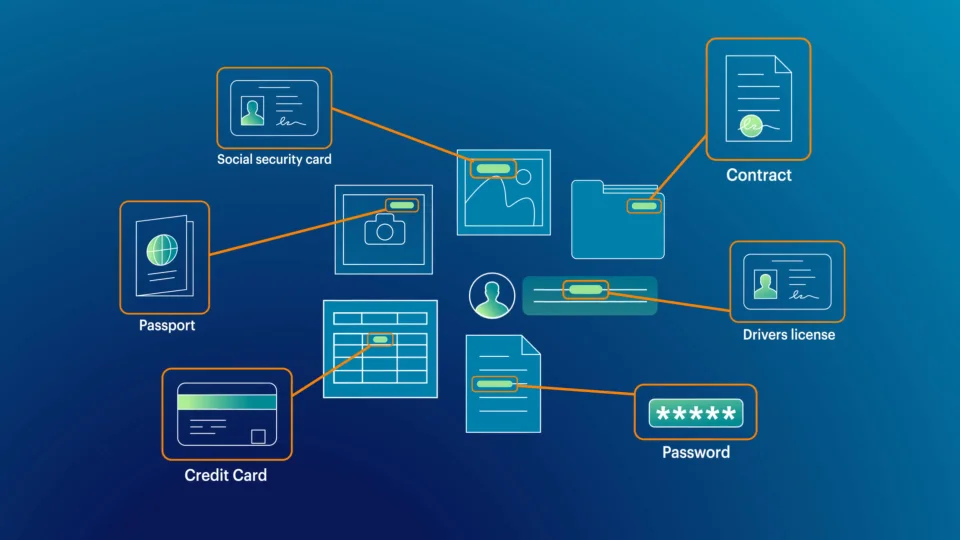
Data Loss Prevention, or DLP, is a system designed to stop sensitive information from being lost, shared, or stolen. It’s a safety net for your company’s most important data. Think of it as a digital security guard that’s always on duty, watching over your files, emails, and devices.
So, what is data loss prevention, really? At its core, it’s a smart system that monitors, detects, and blocks any unauthorized sharing of data. This includes things like customer details, personal records, trade secrets, or confidential company information.
Whether the threat is accidental (like an employee emailing the wrong file) or intentional (like someone trying to steal data), data loss prevention software steps in to prevent the damage.
Why Every Business Needs Data Loss Prevention Software
We live in a digital world where data is always moving. It’s stored in the cloud, sent over email, copied to USB drives, or shared on collaboration tools. That’s great for productivity—but it also increases the risk of leaks or breaches.
Here’s why DLP software is more important than ever:
- Employees are working remotely and using personal devices.
- Cyberattacks are more advanced and frequent.
- Regulations are stricter, like GDPR, HIPAA, and CCPA.
- Data is more valuable than ever—especially personal and financial info.
The job of data loss prevention software is to make sure your sensitive information stays protected, no matter where it goes.
So, how does a data loss prevention system work? Let’s dive into that next.
How Does a Data Loss Prevention System Work?
This is the heart of it all. Understanding how DLP works helps you see why it’s such a powerful tool.
Here’s a simple breakdown:
- Data Identification
First, the system finds and labels sensitive data. This could be credit card numbers, Social Security numbers, health records, or internal company documents. - Policy Creation
You set rules, or “policies,” that tell the system what should and shouldn’t happen with certain data. For example, you might block employees from sending sensitive files to personal emails. - Monitoring and Detection
The DLP software constantly watches data as it moves—across emails, cloud storage, endpoints, and more. If someone tries to send, copy, or delete sensitive info in a risky way, the system notices. - Blocking and Alerting
If a policy is violated, DLP can block the action completely, warn the user, or alert IT. You can choose the response depending on how serious the situation is. - Reports and Logs
Finally, DLP systems provide reports so you can track where data is going and how it’s being used. This is super helpful for audits and compliance checks.
To put it simply, data loss prevention software watches, controls, and protects your data 24/7.
Powerful Features of Data Loss Prevention Software
Modern DLP software is packed with features that go beyond just blocking risky actions. Here’s what to look for:
1. Insider Threat Detection
Not all threats come from outside. DLP tools can spot unusual activity from employees or contractors who may pose a risk.
2. Content and Context Awareness
DLP doesn’t just look at file names. It reads the actual content and understands the context. This means it knows when someone is trying to move a customer database—even if they rename it.
3. User Behavior Monitoring
The software learns how users typically behave. If someone suddenly starts downloading large amounts of sensitive info, that’s a red flag.
4. Real-Time Alerts and Blocking
No delays here. DLP software responds immediately when something goes wrong, helping you stop problems before they spread.
5. Multi-Channel Coverage
It watches data across all channels—email, cloud apps, USB devices, messaging apps, and more.
6. Custom Policies
You can customize rules based on departments, roles, and locations. This gives you the control to balance security and productivity.
7. Easy Integration
The best DLP tools integrate with Microsoft 365, Google Workspace, Dropbox, Slack, and many other platforms your business may already use.
Key Benefits of Using DLP Software
Why is everyone talking about data loss prevention software? Because it works. Here are some of the top benefits:
- Protects sensitive data from leaks or theft
- Reduces human errors, like sending an email to the wrong person
- Builds trust with customers, clients, and partners
- Meets industry regulations and avoids big fines
- Improves overall data visibility and control
- Stops data breaches before they happen
Whether the issue is malicious or accidental, DLP software helps protect what matters most—your data.
Compliance and Privacy: Staying Legal and Ethical
There are strict rules about how you handle data. Depending on your industry, you might need to comply with:
- GDPR (Europe)
- HIPAA (Healthcare)
- PCI-DSS (Payments)
- CCPA (California)
Breaking these rules can lead to huge fines and loss of trust. DLP software helps your business stay compliant by enforcing data policies, keeping logs, and preventing violations.
But what about privacy?
It’s a fair question. The key is to use DLP software ethically. Let employees know what’s being monitored and why. Use clear policies and respect personal boundaries. Transparency builds trust—both inside and outside your company.
Real-World Use Cases: How Different Industries Use DLP
Let’s take a look at how DLP software works in the real world:
Healthcare
Hospitals use DLP to protect patient records and comply with HIPAA regulations.
Financial Services
Banks use it to stop sensitive data like account numbers and personal IDs from being leaked.
Retail and E-Commerce
Stores use DLP to protect customer credit card data and online transaction records.
Education
Schools use DLP to keep student data and academic records private.
Corporate Offices
HR teams, legal departments, and finance teams use DLP to protect confidential documents and employee information.
Remote Teams
As more people work from home, DLP ensures company data is protected on personal devices and networks.
Choosing the Right DLP Software for Your Business
Not all DLP tools are created equal. Here’s what to consider before making a decision:
- Scalability: Can it grow with your business?
- Ease of Use: Is the interface user-friendly for both IT and employees?
- Integration: Will it work with your current software and platforms?
- Custom Rules: Can you tailor the policies to your unique needs?
- Support and Training: Is customer service available when you need help?
- Reporting Tools: Are logs and analytics easy to understand?
Always ask for a free trial or demo before buying. This helps you see how it fits into your daily workflow.
Best Practices for Implementing DLP Software
Getting started with data loss prevention doesn’t have to be complicated. Just follow these steps:
- Identify Sensitive Data
Figure out what data you need to protect the most. - Define Clear Policies
Set rules for how data should and shouldn’t be handled. - Educate Your Team
Training helps employees understand why data safety matters. - Start Small, Then Scale
Begin with one department or type of data, then expand over time. - Review Regularly
As your business changes, so should your data protection strategy.
Future Trends in DLP Software
The world of cybersecurity is always evolving. Here’s what’s coming next in the world of data loss prevention:
- AI-Driven Detection
Artificial intelligence is making DLP smarter and more accurate. - Cloud-Based Solutions
More businesses are moving to cloud-native DLP tools for easier management. - Mobile and BYOD Support
DLP is extending protection to smartphones, tablets, and personal laptops. - Zero Trust Security Models
DLP works hand-in-hand with Zero Trust strategies to enforce tighter access controls. - Automation and Auto-Response
DLP tools will automatically act when threats are detected—faster than ever before.
The future looks bright—and a lot more secure.
Final Thoughts: Why DLP Software Is Worth It
So now you know: how does a data loss prevention system work? It’s a reliable, always-on solution that helps businesses stop data leaks, protect privacy, and stay compliant with laws.
Whether you’re in finance, healthcare, education, or tech—your data matters. And protecting that data isn’t just smart—it’s essential.
Investing in data loss prevention software gives you peace of mind, better control, and a safer future for your business.
So the next time someone asks, “What is data loss prevention?”, you can tell them—it’s the shield every modern business needs.
